How to Manage Meeting Follow-Ups Without Chasing Your Team
Key Takeaways
- Businesses face follow-up problems because meetings often end up without clear, well documented notes and actionable tasks.
- Scattered notes and unclear accountability and ownership can lead to project delays, productivity issues, and wasted time.
- Manage meeting follow ups by assigning owners and setting deadlines in the missing.
- Tools like BuzyTeam’s AI Meeting Assistant reduce manual work by turning every meeting into tracked, assigned tasks.
- Such tools boost team collaboration, streamline workflows, and enhance overall productivity without chasing them for updates.
Effective communication is the backbone of any successful business. Most teams know the feeling when important decisions get lost once the team meeting ends. Notes are scattered across notebooks, the mind is completely cluttered and chat threads seem like a never ending maze. Everyone in the team feels like they’re chasing their own tail, affecting team collaboration and overall productivity.
Businesses often struggle to manage meeting follow ups, leading to lost time, missed action items, delayed tasks, and poor accountability. If you multiply this across five teams and ten team members, then a huge amount of discussions and updates will disappear. This will impact workflows and the team’s success.
This isn’t a discipline issue. It’s a system problem. When every conversation and discussion on audio and video calls lives only in your memory or scattered notes, it’s never converted into actionable work. The good news is that you can easily manage meeting follow ups without chasing your team using the following guide. Nowadays, businesses use robust team management software that promotes team collaboration and communication for a hassle free, well organised and streamlined workflows and productivity.
Let’s Get Started!
1. What is the Role of Professional Meetings in Organisations?
Whether you have a small financial service business or a software development firm, managers schedule professional meetings to communicate, collaborate, discuss ideas and share updates with the entire team at the same time. They allow real time interactions between employees and different departments to discuss changes and progress on projects.
Audio and video meetings also help you collaborate with your in office and remote teams efficiently while reducing communication gaps. This ensures everyone stays connected with shared objectives, tasks and project deadlines.
2. Why Do Businesses Fail to Manage Meeting Follow Ups: Key Reasons
It is essential to understand the real pain points behind meeting chaos and scattered information. A majority of teams make the following blunders:
Notes/ Discussions Get Lost or Forgotten:
Believe it or not! Meeting notes often get lost in a notebook, making everything look chaotic and scattered. You don’t even remember what you heard or wrote, leading to serious blunders. A week later, nobody remembers exactly what was discussed to complete the assigned task or project.
Lack of Ownership for Each Task:
When a decision is made in a meeting with the entire team, it is easy for everyone to pass on their responsibility to others. Without clear accountability, action items quietly fall through the gaps. This happens because ownership was never actually assigned.
No Clarity in Deadlines
Meeting follow ups often fail to turn into actionable tasks because the deadline was never discussed with the entire team. This could lead to incomplete tasks, project delays and unexpected expenses. It is important to boost effective team collaboration through meeting notes.
Switching Between Different Tools
Office/work meetings usually happen in one app while notes are taken in another and tasks are recorded in a third. This creates chaos, leading to distraction and lost discussions. It is good to use centralised workforce management software that aligns well with team collaboration, HR management, productivity management, task and project management, and employee training for streamlined and structured workflows.
Below are strategies to manage meeting follow ups without chasing your team all the time:
3. Manage Meeting Follow Ups by Assigning Ownership
Do not wrap up a professional/work meeting without assigning ownership to your team members. Every actionable task needs one owner so that it will be completed on time without any chaos or confusion.
Assign it live in an audio and video call or meeting without any hesitation because business operations need a proper roadmap for higher productivity.
Set Clear Deadlines Right Away
Managers must attach a specific date to every task while discussing changes and everything on a call. This brings clarity and helps complete the project or task within a given timeframe, reducing delays and unnecessary confusion.
Bring Visibility to Follow Ups
Instead of messaging your team members individual to check on progress, use a shared task board or track where everything is visible. This helps you gain visibility on follow ups without chasing your team. This will help identify discrepancies or productivity gaps within a team.
Use a Centralised Platform for Effective Team Collaboration
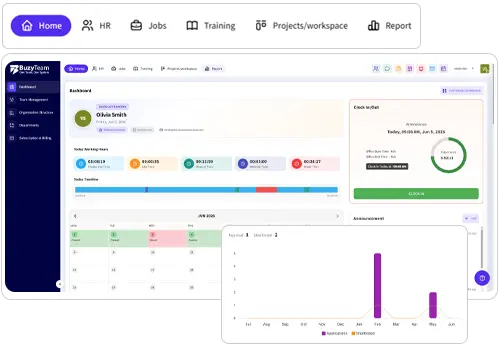
To make the most of your meeting discussions, ensure you streamline the entire process. Meetings, notes, decisions and tasks should appear in one shared space that everyone can access. You can use team collaboration software that keeps the information intact, notes well structured and tasks properly assigned to prevent delays. That’s where BuzyTeam’s Chat and Meeting comes in.
The chat and meeting not only bring your team, conversations, files and projects together in one connected workplace, but it also hosts HD meetings that turn every discussion into meaningful action using AI. The newly introduced AI Meeting Assistant is a game changer for teams of all types and sizes.
4. How AI Meeting Assistant Manages Meeting Followups?
The AI Meeting Assistant is a game changing feature in BuzyTeam’s Chat and Meeting Module that automatically converts your meeting conversations into well-structured, clear and actionable summaries. It aligns with BuzyTeam’s existing Meeting tools that include HD audio/video calls, screen sharing, and meeting recording.
Everything happens on one connected platform, without switching to a separate transcription, notepad, or any other app i.e team collaboration software. The AI Meeting Assistant uses advanced speech recognition and NLP to transcribe conversations, identify key discussions, and create AI summaries on the go. It detects actionable commitments and automates them into tasks for team members. You can use the Chat and Meeting software and boost team collaboration like never before and boost workforce planning in 2026.
5. How Does AI Meeting Assistant Work?
BuzyTeam’s Meeting feature not only saves you time but also streamlines collaboration and workflows in real time while keeping your team organised and productive. With AI Meeting Assistant, you can easily turn important discussions into actionable work without any hassle. Let’s see how it works:
Step 1: AI Meeting Transcripts
Every Meeting on BuzyTeam is automatically converted into an easy-to-read transcript. Team members don’t need to scrub through a recording to find what was said or discussed. They can simply search the transcripts for a decision, name or keyword.
Step 2: AI Meeting Summaries
Don’t waste your time reading a full transcript once a meeting wraps up. The Meeting Assistant AI creates crystal clear summaries, outlining key discussions, decisions made and key takeaways. This way, you can keep your entire team aligned with the set goals without the stress of writing notes. In fact, if anyone missed the meeting can gather information in minutes.
Step 3: Action Item Detection
The AI Meeting Assistant works silently from background while you are having important discussions and identifies tasks and commitments in real time. The best part is that it automatically identifies tasks while reducing the manual work of taking notes.
Step 4: Auto Create Tasks
This is where the AI Meeting Assistant turns meeting discussions into action, saving you time and energy. Detected action items can be converted into tasks and assigned to the right employee with a single click. This feature will take your team communication and collaboration to the next level. Make sure you provide proper employee training for better understanding and quality work.
6. Why Do Businesses Need AI Meeting Assistant Feature?
Businesses often lose productivity because meetings don’t consistently turn into follow thorough. However, by automating transcription, generating AI meeting summaries, action item detection and task creation- all from one workspace- you will save a lot of time and boost everyone’s productivity. The result is fewer dropped commitments, well structured plans, and a clear record of what was decided and by whom without chasing them.
Wrapping Up
Chasing your team for updates after conducting a meeting is not the right approach. It drains productive hours, creates chaos and puts too much pressure on everyone. Make sure you understand what’s lacking in your team meeting, thoroughly discuss points, assign ownership, and create deadlines to keep everything organised. Apart from this, pair good team collaboration practices with a tool that automates transcription, summaries and creates tasks on the go without any chaos.
Frequently Asked Questions
1. Why do teams miss key details during meetings?
Teams miss important meeting minutes due to poor note taking, unclear communication, overloaded information, distractions, and lack of structured follow-ups.
2. How does poor note-taking affect team productivity?
Scattered notes can cause missed tasks, forgotten discussions, unclear responsibilities, delayed projects, and unnecessary follow-ups, reducing overall team productivity.
3. What should be included in a team meeting follow up?
It should include key decisions, responsible team members, action items, deadlines and any potential questions or dependencies.
4. What is the best way to assign ownership/ accountability after a meeting?
Assign every action item to a specific person with a clear deadline and expected outcome. This brings visibility into ownership and accountability.
5. How can I manage workflow without chasing my team for updates?
You can use BuzyTeam’s Chat and Meeting tool for team communication and collaboration. The AI Meeting Assistant automatically creates transcripts, generates meeting summaries, detects action items and converts them into assigned tasks- all from one place.